User Guide
Everything you need to get started with Voicify.ai.
Quick Navigation
Prerequisites
-
✓
Windows 10 or 11 – The app runs natively on Windows.
-
✓
Internet Connection – Required for AI transcription (cloud-based).
-
✓
Microphone – Built-in or external mic for voice input.
-
✓
API Key – Free from Groq, OpenAI, or Google (see below).
Installation
Download the installer from the homepage and run it. Windows SmartScreen might popup – click "More Info" → "Run Anyway" (since we are an indie developer without an expensive code signing certificate).
Getting an API Key
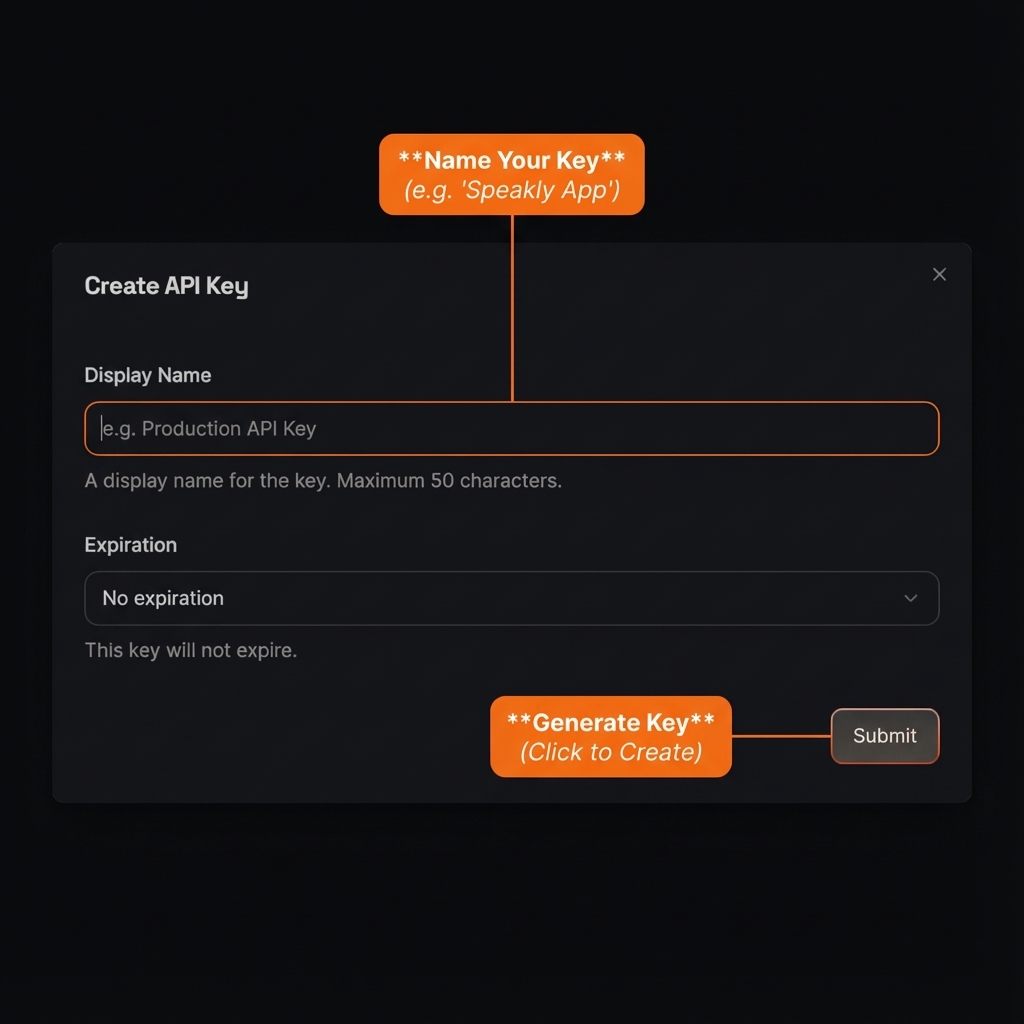
We recommend Groq for the fastest and free experience. Here's how to get a key:
- Go to console.groq.com/keys
- Sign up for a free account (Google login works)
- Click "Create API Key"
- Copy the key (starts with
gsk_...) - Paste it into Voicify.ai settings
Settings Overview
Click the gear icon (⚙️) on the app window to open settings.
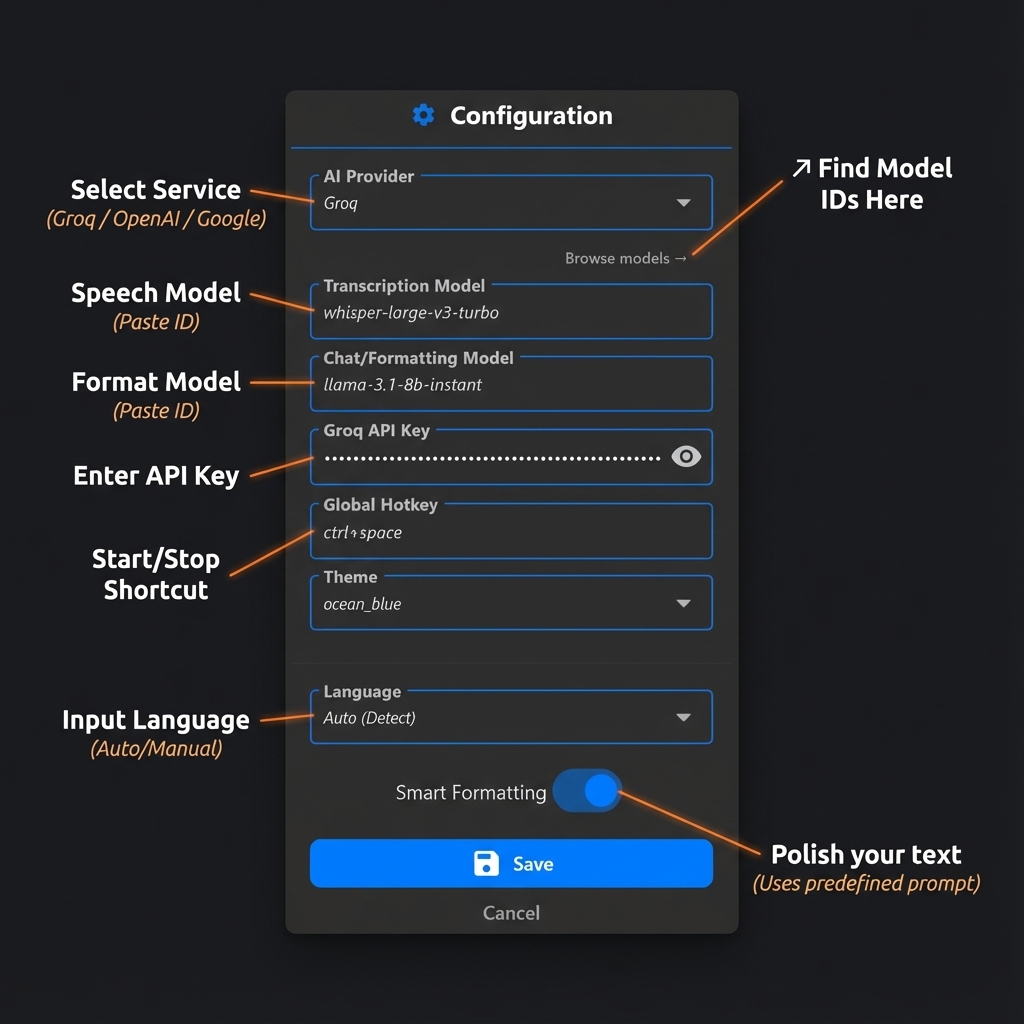
Changing AI Provider
Choose between Groq, OpenAI, or Google. Each has different models and pricing:
- • Groq – Fastest, free tier available
- • OpenAI – Most accurate, pay-per-use
- • Google – Gemini models, good multilingual
Changing Model Names
Each provider has configurable model names. Check our Model Pricing Guide to find compatible models and copy their exact names.
Changing Theme/Color
Select from built-in themes: Ocean Blue, Sunset Orange, Emerald Green, Royal Purple, or Cyberpunk.
Changing Hotkey
Default is ctrl+space.
You can change this to any key combination like alt+shift+r.
Your First Dictation
Click any text field (Notepad, Chrome, Slack, VS Code) and use the hotkey:
Press once to start recording, speak naturally, then press again to stop — or simply wait 3 seconds and it stops automatically. Your text will appear instantly!
Quick Demo Video
Here's a short walkthrough showing how to use Voicify.ai in action. Watch this to get started quickly!
Using Smart Actions
Don't just dictate. Command. Smart Actions let you transform text instantly by saying a "Keyword" first.
How to add custom actions (Pro):
- Open Settings > Scroll to Smart Actions.
- Click "Add Smart Action".
- Keyword: The word to trigger it (e.g., "todo").
- Goal: The instruction (e.g., "Convert to markdown checklist").
- Save it, and it works instantly!
Upgrading to Pro
Your free trial lasts 7 days. After that, you'll need to upgrade to continue using the app.
- Open the app and click the profile icon (👤)
- Click "Upgrade to Pro"
- Complete the payment (₹90/month)
- Your account will be instantly activated
Current Limitations
- • Theme Color Change: When you change the theme color in Settings, it will only reflect after either restarting the app or starting the next dictation.
We're actively working on fixes. Updates will be pushed automatically.